AI 生图 + 切切贴 完整工作流示例
用 AI 生图工具生成 4×4 表情大图 → 导入切切贴切片精调 → 导出微信规格 PNG → 上架微信表情商店。
1AI 生成的 4×4 表情大图(示例)
下面是一张用上述 Prompt 在 AI 生图工具中生成的 Q 版表情包大图。注意它的特点:
- 严格 4×4 网格:16 个格子等宽等高,白色间隔均匀——这正是切切贴默认的 4×4 切片模式要处理的格式。
- 每格独立:角色、文字、装饰元素都完整落在各自格子里,不会跨格——切片后每张都是完整的单张表情。
- 白底 + 白描边:纯白背景、角色周围有白色 die-cut 描边——切切贴的「去除白色背景」+「白色贴纸描边」可以进一步优化。
- 带英文 Caption:每张下方有文字标签——上架微信时可替换为中文含义词。
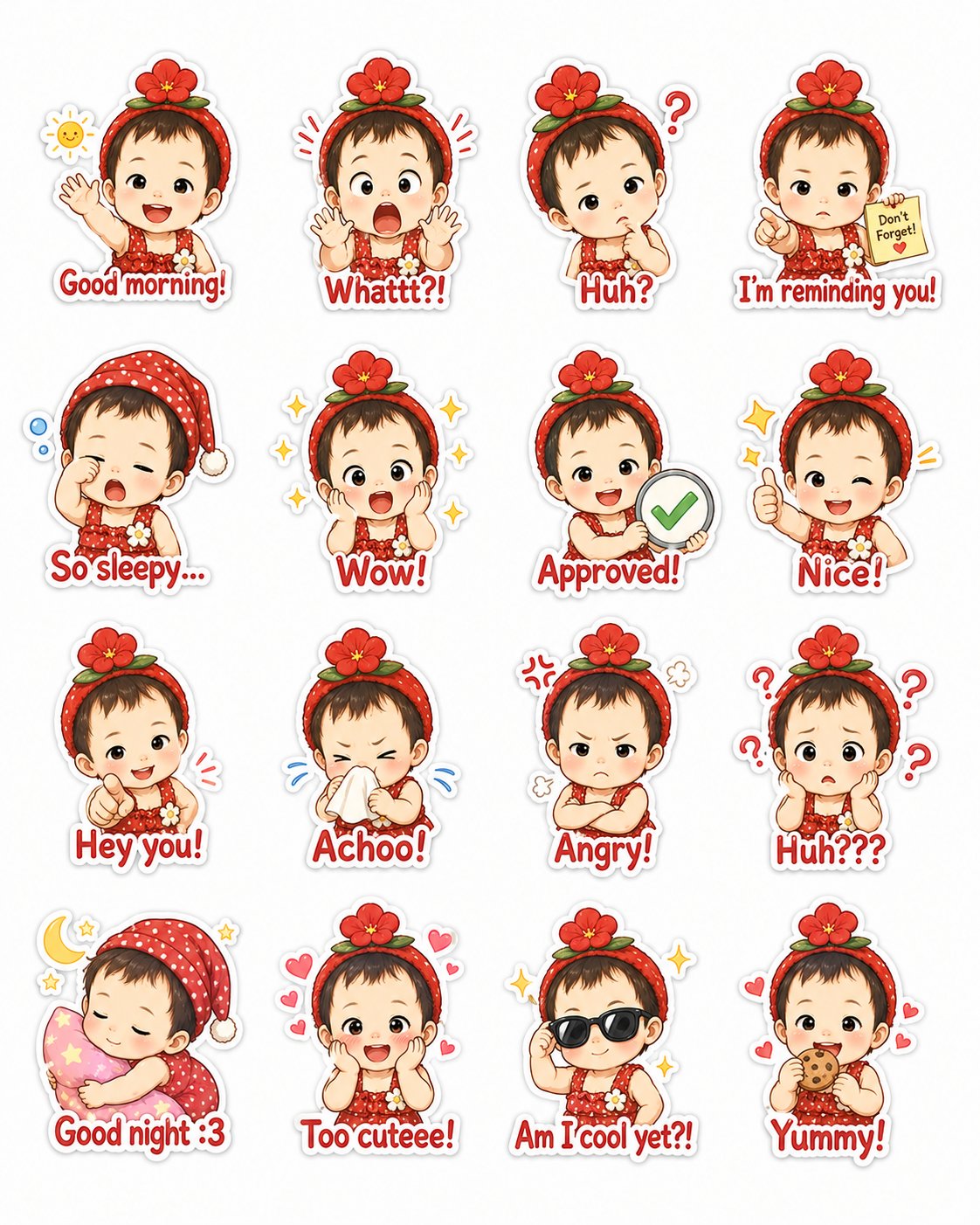
↑ AI 生成的 4×4 Q 版表情大图(点击可查看原图)
2Prompt 模板(可直接复制)
下面是生成这张图的完整 Prompt。你可以:
- 复制 Prompt → 粘贴到 AI 生图工具(如 Midjourney、DALL·E、通义万相、混元生图等)
- 把开头的「上传参考照片」换成你自己的照片/形象
- 修改 16 个表情的文字和动作描述来定制你的表情包
- 生成后下载大图 → 导入切切贴 → 自动 4×4 切片
Using the uploaded reference photograph as the only character reference, create a cohesive chibi sticker pack featuring the same person.

IDENTITY:
Faithfully preserve the person's recognizable facial features, hairstyle, hair color, skin tone, eye shape, age, and overall identity from the reference photograph. Transform the person into an adorable polished chibi character with a large head, small body, short limbs, expressive eyes, soft rounded facial features, and consistent clothing across all stickers. The same character must appear in every panel with strong identity consistency.

CANVAS AND GRID:
Create one clean vertical 4:5 canvas containing exactly 16 separate stickers arranged in a strict 4-column × 4-row grid.
- Exactly 4 columns and exactly 4 rows
- All 16 cells must have identical dimensions
- Wide, uniform white gutters between every cell
- Equal outer margins on all four sides
- One sticker centered inside each cell
- Keep every character and caption fully inside its own cell
- Leave at least 12% empty safe space around every sticker
- No element may cross into another cell

STICKER STYLE:
Cute premium illustrated chibi sticker style, clean professional line art, soft pastel colors, smooth cel shading, lively facial expressions, charming hand-drawn details, playful poses, polished commercial messaging-app sticker quality.
Each sticker must have:
- A transparent-sticker visual appearance on pure white background
- A thick, smooth, uniform white die-cut outline surrounding the character and caption together
- A very subtle light-gray outer shadow
- Large, readable caption text — one caption only per sticker
- Minimal decorative accents (hearts, stars, sparkles, motion lines, etc.)

Create 16 stickers in left-to-right, top-to-bottom order:

ROW 1:
1. "Good morning!" — happily waving, cheerful smile, tiny sun accent.
2. "Whattt?!" — extremely shocked expression, wide eyes, open mouth, hands raised.
3. "Huh?" — confused expression, tilted head, one raised eyebrow, small question mark.
4. "I'm reminding you!" — pointing forward seriously but cutely, holding a tiny reminder note.

ROW 2:
5. "So sleepy..." — yawning, rubbing one eye, wearing a cute nightcap, tiny sleep bubbles.
6. "Wow!" — amazed sparkling eyes, hands beside cheeks, stars and sparkles.
7. "Approved!" — confident happy expression, holding a large approval stamp or check mark.
8. "Nice!" — cheerful thumbs-up pose, bright proud smile.

ROW 3:
9. "Hey you!" — playfully pointing toward the viewer, mischievous friendly expression.
10. "Achoo!" — cute sneezing pose, holding a tissue, tiny motion lines.
11. "Angry!" — adorably grumpy, puffed cheeks, crossed arms, tiny comic anger symbol.
12. "Huh???" — deeply confused and overwhelmed, several question marks circling the head.

ROW 4:
13. "Good night :3" — sleeping peacefully while hugging a small pillow, moon and stars.
14. "Too cuteee!" — blushing excitedly, hands against cheeks, surrounded by tiny hearts.
15. "Am I cool yet?!" — wearing stylish sunglasses, confident pose, playful sparkle.
16. "Yummy!" — happily eating a favorite snack, delighted expression, tiny food sparkles.
使用提示:
- 不同 AI 工具对 Prompt 的遵循度不同,Midjourney / DALL·E 效果通常最好;国产工具(通义万相、混元)也能用,可能需要多跑几次挑最好的那张。
- 如果生成的网格不够整齐,可以在切切贴里拖动橙色参考线手动校正——这是切切贴的核心优势之一。
- 建议一次生成多张(--q 或变体),选网格最规整的那张导入。
3从零到上架:完整流程
- 准备参考图
拍一张正面清晰的照片(或用你喜欢的 IP 形象),作为 AI 生图的「人物参考」。 - AI 生成 4×4 大图
把上面的 Prompt 粘贴到 AI 生图工具,替换人物描述和表情内容。生成一张白底、4×4 网格、带描边的表情大图。 - 导入切切贴
打开切切贴工作台,拖入或粘贴刚生成的大图。 - 校正切片
默认 4×4 等分;如果 AI 生成的格子不均匀,拖动橙色参考线让每个角色完整落入单格。 - 逐张精调
选中每一格:- 勾「去除白色背景」清除多余白底
- 勾「白色贴纸描边」(微信推荐 2~7px 白边防锯齿)
- 用橡皮擦擦掉漏网的白点或瑕疵
- 调缩放 / 位置 / 留白让角色居中且不切边
- 导出全部 ZIP
输出尺寸选「主图 240」(微信标准),点「导出全部 ZIP」→ 得到 16 张按序号命名的透明 PNG。 - 产出其他物料
在切切贴里切换输出尺寸:- 「图标 50」→ 挑最简洁的一张做聊天面板图标
- 「横幅」(750×400)→ 做详情页横幅(加实色背景)
- 封面图从主图里挑最醒目的一张即可
- 投稿微信表情开放平台
登录sticker.weixin.qq.com→ 投稿「表情专辑」→ 按规范上传各素材 → 填写名称/简介/含义词 → 提交审核。
✦开始制作
准备好参考图了吗?直接进入工作台开始切片。
打开切切贴工作台 →示例图片由 AI 生成 · Prompt 可自由修改用于个人创作
切切贴 · 图片全程在浏览器本地处理,不会上传云端